
General
The categories and fields shown in the product select popup can be determined in the settings. The fixed categories of the products can be used in the popup, and this way you can use both the Search field and the categories to filter the products.
The product select popup customization can be done in Settings → Additional Settings.
In the product select popup Customization section you can determine all the settings regarding the product popups. In the Show picklist fields you can select the categories that will be shown in the product popups and can therefore be used to filter the products (see the picture below).
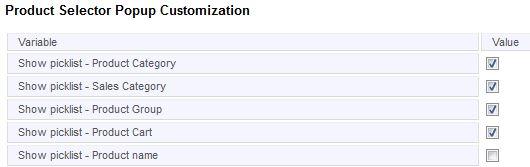
In the Popup fields field you can determine the fields that will show as the columns in the product select popup (see the picture below).

In addition to these settings, there are also other settings that can be determined if needed. For example, in the Disable products fields you can select the products, that should not be shown or selected in the popups in the particular module.
Picklist Values
The picklist values in the popup category picklists are fetched from the products. These values can be edited in the picklists’ settings in Settings → Picklist Editor. See the guide Picklist Editor for more information.
Product Search
When all the settings have been determined, you can use the categories as a part of the search. The settings affect all the modules where you can link a product to the entity.