
General
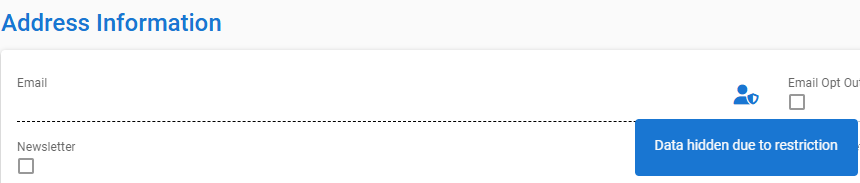
The Restricted Fields feature allows certain contact information to be visible only to users who have been explicitly granted access rights by an admin user. From the user’s perspective, this means that some field data may be hidden and displayed with the message “Data hidden due to restriction.”
The feature protects sensitive data such as contact or address details and other confidential fields. A user can only see information to which they have been granted access. Restricted fields can be used, for example, in cases where a contact has requested that their information be protected due to a confidentiality or non-disclosure requirement.
Getting Started
Restricted fields are activated for a contact via the Actions button, under which you will find the tool Set Restriction. The system then asks which fields should be hidden (available fields are those within the blocks that the admin user has defined as restrictable in settings).
Once the fields are selected, click Save, after which the system prompts for a reason.
The user enters the reason (for example, “Customer requested non-disclosure”) and saves — the changes then take effect immediately.
A restriction can similarly be removed using the Remove Restriction option found under the Actions button. This option is visible only on contact records where a restriction has been applied.
Usage
When Restricted Fields are enabled, the contact’s detail view may include both open and restricted sections. Open fields are displayed and function normally, while restricted fields are clearly marked and behave differently depending on the user’s permissions.
If the user has permission to view restricted data, the restricted field information can be accessed via the Actions button under Show Restricted Data. The system first prompts for a reason before opening a window displaying the restricted information.
If the user also has permission to edit restricted fields, they can perform the same actions as with normal fields — create, edit, and delete data. All changes are saved as usual, but the user must provide a reason for the modification.
If the user does not have viewing rights for a restricted field, that section will not open at all. Instead, the interface displays a message indicating that the information is restricted.
Field values are not displayed and cannot be searched or linked directly from other views.
If the user has limited permissions (for example, view-only access without editing rights), the restricted field is visible but cannot be modified.
For all operations related to restricted fields, the user must provide a reason for their actions, and these details are recorded in the system log.
Identifying the View
Restricted fields are visually distinguishable in the interface. A restricted field is not shown as an empty value; instead, it is separated from normal fields by a dashed line and an icon. When hovering over the icon, an informational message appears stating “Information hidden due to restriction.”
Data that the user does not have permission to access is also excluded from reports, exports, and searches. This means the user only sees data according to their permission level throughout the system, and restricted field values appear empty in filters and other parts of the system.
Notes
The Restricted Fields feature does not affect other, open contact data and does not change how contacts appear in lists or search results. If the user does not have permission to view restricted data, the corresponding field is completely omitted from the view.
Restrictions are defined by the admin user and cannot be changed by users.
If the system indicates that data is restricted or a field is unavailable, this is normal behavior and not an error.
If a user needs broader access rights — for example, permission to edit a specific field — these must be requested from the admin user.