
General
Entities can be deleted from the CRM system in several ways, after which the deleted entities are moved to the system’s recycle bin. Entities are stored in the recycle bin for 30 days, after which they are permanently deleted. The recycle bin is permanently located under the System settings menu, so it is only visible to admin users.
This guide goes through the functions related to the recycle bin. Deleting files is explained in more detail in the basic guide to entities.
Start
The recycle bin is located in the system settings, which admin users can access via the wrench icon at the top of the system (image below).

The first settings that open are the Theme and Brand settings. To access the recycle bin, the user must open the system settings menu, where the recycle bin is located at the bottom (image below).
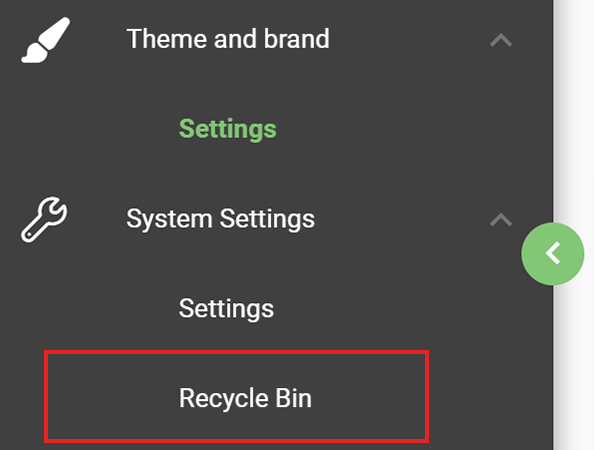
This opens the Recycle Bin user interface, where deleted files are displayed by module.
Recycle Bin user interface
The recycle bin has its own user interface, which consists of the following parts:
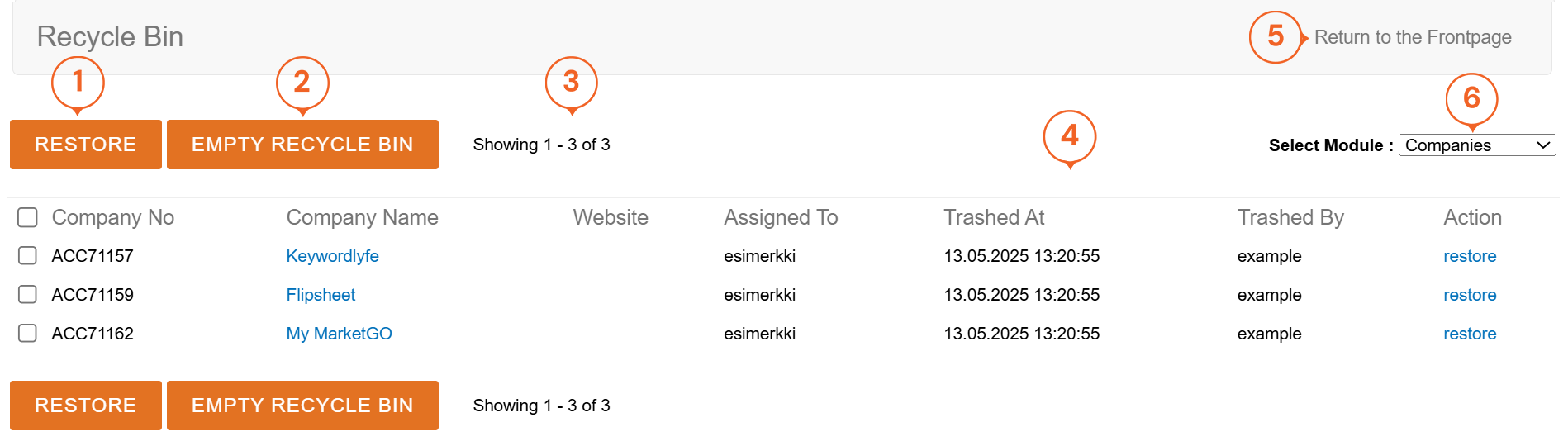
- The Restore button restores all files selected in the list view at once.
- The Empty recycle bin button deletes all entities in the recycle bin.
- The view also displays the number of files in the recycle bin for the selected module.
- The basic information about the entity is displayed in the list. At the end of the list, there is a Restore button for restoring individual entities.
- The Return to the Frontpage button returns the user to the system’s main view.
- The Select module drop-down menu allows the user to change the module from which the data to be deleted is displayed.
The Empty recycle bin button deletes all entities in the recycle bin, i.e. it cannot be used to delete entities from a single module from the recycle bin.
Storing deleted entities in the recycle bin
Deleted entities are stored in the recycle bin for 30 days, after which they are permanently deleted. This means that accidentally deleted entities can be restored to the system within 30 days. The user can also empty the recycle bin manually, which will immediately delete all entities in the recycle bin.