
General
It is possible to use the CRM system in several different languages. You can activate or deactivate languages by accessing Settings and selecting the Module Manager.
By default, the Module Manager shows the Modules tab first, but you can manage translations by selecting the Languages tab (see picture below).
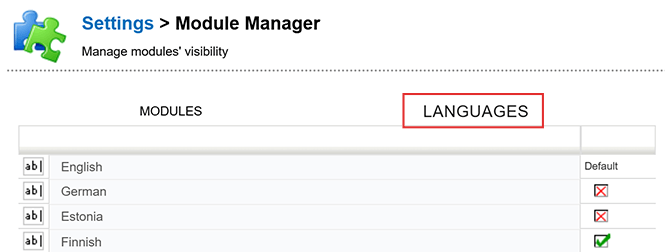
This view allows you to determine which language versions of the system can be selected and used.
When a language is set to active/inactive in the Languages tab, the view will automatically return to the Modules tab. It is therefore necessary to set the active/inactive status for each language individually.
It is good to note that all available system languages are not actively updated, or the translation the system has might not suit your needs. After activating the language in the system it is recommended to check Field Translations to ensure that all fields in the system are translated properly. The Picklist Editor is used to translate all picklist values and all other translations are controlled using Global translations.
Using the active languages
Once a language is active in the Module Manager, it will be available for selection at login. Browser cookies remember the user’s choice, so unless browser history is cleared, the default language is the last used when logging in with that browser. User can always change their default language by using the Select Language picklist.
Languages – Frequently Asked Questions
Will the system remember each user’s language preference?
Yes, the system uses browser cookies to remember the user’s language preference. The default language is the last language used unless the browser history is cleared.
Can I change the translation I don’t like?
Yes, admin users can freely edit the system translations by using Field Translations, Picklist Editor, and Global Translations. Almost everything in the system can be changed or translated freely.
Glossary
- Default language
- The language that is automatically selected when a user is logging into the CRM system, based on their last choice.
- Module Manager
- A feature within the CRM system’s settings that allows users to manage different modules and language settings.